Duplicates, Derivatives and Lineage
How FileSpin finds exact copies and similar images of an asset, keeps edits made inside FileSpin attached to their original, and what an AI agent gets back when it checks for copies.
FileSpin keeps copies of an asset traceable to it in two ways:
- Edits made in FileSpin never become loose copies. Renditions belong to the original, AI edits are linked to it, and replacing a file keeps its history.
- Copies that came in from outside can be found. Exact copies are found by checksum. Similar images (resized, re-saved, mirrored, cropped or edited) are found by a perceptual hash and a copy-detection image embedding, and each result says how it matched.
This guide covers both, and what the dashboard, the API and an AI agent show for each.
Edits made in FileSpin stay attached to the original
| What you do | What FileSpin stores | Where the rights live |
|---|---|---|
| Resize, crop, change format, quality, watermark | Nothing new: an on-demand rendition of the same asset (Image Transformations) or a stored conversion on it | On the one asset, so every rendition is covered |
| An AI edit saved as a new asset (enhance, background removal, generative fill, …) | A new asset, linked to its source as parent_child with origin: auto and the operation as subtype (Asset Relationships) | On each asset; the link says where the new one came from. New assets from an AI edit start private, and copying the source's metadata is an explicit choice |
| Replace the file | A new content version of the same asset, optionally held for release while the current one keeps serving (Replace Asset Content) | On the one asset; earlier versions stay restorable |
So for work done inside FileSpin, a resize or crop is a URL on the original, not a second file to keep track of.
Finding copies that came in from outside
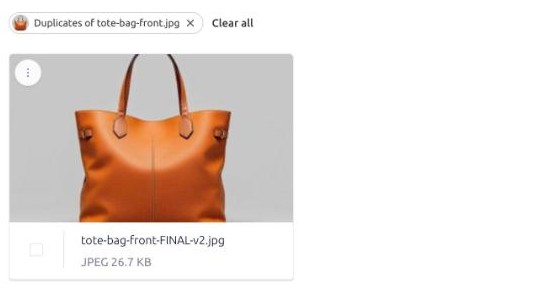
Files downloaded, edited elsewhere and uploaded again are separate assets. FileSpin finds them per asset, from the dashboard, the API or the AI agent.
Exact copies
The same file bytes (same MD5 checksum), under any file name.
GET /api/v1/assets/{asset_id}/content/original/duplicates
Results are paged, 30 to a page. See Find Duplicates and Similar Images.
Similar images
Add match=similar to the same call:
GET /api/v1/assets/{asset_id}/content/original/duplicates?match=similar
FileSpin compares images in two ways:
- A 64-bit perceptual hash. Two images whose hashes differ in only a few bits look alike, even when their files are different. FileSpin also keeps the hash the mirrored image would have, so a flipped copy is found as well.
- A copy-detection image embedding. A vector that describes this particular photo rather than what it shows, so a crop or an edited copy stays close to its original while a different photo of the same product does not.
| Found | Not found, or not reliably |
|---|---|
| Resized, downscaled or re-saved copies, any format (JPEG, PNG, WebP, AVIF, TIFF) | A different photo of the same product or scene |
| Colour, exposure or white-balance changes | Videos, PDFs and other non-images; SVG and HEIC images |
| Mirrored copies | Larger crops: about three in four are found when 30 % of the picture is cut away, about half at 50 % |
| Crops that cut away up to a fifth of the picture | Copies padded to a new shape (square, letterbox), placed in a layout or collage, or shown inside a screenshot |
| Text banners, logos or watermarks added | Background-removed cut-outs (about a quarter are found) |
| Small rotations of a few degrees | Rotations of 90° or more, upside-down flips |
These figures come from a test on about 56,000 edited copies of public photos, product shots and graphics, searched against 100,000 other images.
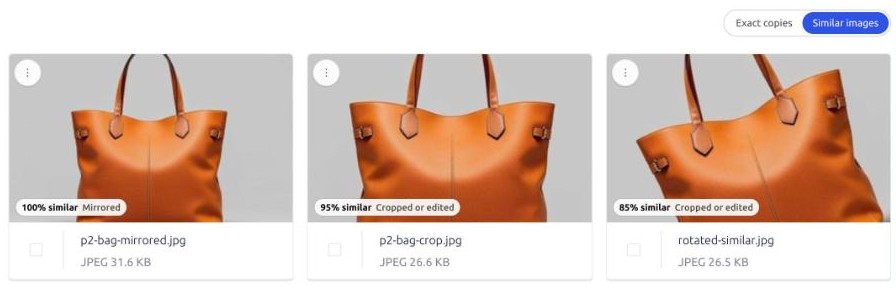
The response keeps every exact-copy field and adds:
{
  "duplicates": ["425f6a2a266d45d58d067f7c39a2e4bd"],
  "phash_available": true,
  "embedding_available": true,
  "max_distance": 4,
  "similar_total": 3,
  "similar": [
    { "id": "8f0e1b2c3d4a4e5f8a9b0c1d2e3f4a5b", "method": "mirror", "distance": 0, "score": null, "similarity": 1.0, "relationship": null },
    { "id": "093081e2bc47437eb4e95233ddf6ddff", "method": "hash", "distance": 2, "score": null, "similarity": 0.97, "relationship": "child" },
    { "id": "c6dd202f494c480e8e18429421378078", "method": "embedding", "distance": null, "score": 0.95, "similarity": 0.95, "relationship": null }
  ]
}
methodsays how the image matched:hash(resized, re-saved or colour-adjusted),mirror(a flipped copy), orembedding(a crop or an edited copy). An image found more than one way is listed once.similarity(0 to 1) is on every result and is the sort order, most similar first, at most 100.distanceis the number of hash bits that differ, forhashandmirrormatches (up tomax_distance, currently 4). It is always an even number.scoreis the embedding's similarity (cosine): always set forembeddingmatches, and also for ahashormirrormatch the embedding found too.relationshipis how that image is already linked to this one in FileSpin, if it is:parent,child,relatedor a custom type. For example, an AI edit is achildof the image it was made from.nullmeans no link has been recorded.phash_available: falseorembedding_available: falsemeans this asset is not indexed that way yet: it is not an image, or it was uploaded before indexing started. It does not mean there are no copies. An image searched without an embedding is queued for one, so calling again a minute later usually returnsembedding_available: true.- Exact copies are listed under
duplicatesonly, never repeated undersimilar.
Scope is the same as for exact copies: the caller's group, or only their own uploads when group asset access is off. Trashed assets are left out.
What to do with a copy
A copy that came in from outside usually lacks the original's licence, usage rights and other metadata. Two things help:
- Give it the original's rights metadata. Select the copies and edit their metadata in bulk (the dashboard keeps an undo for 7 days), or call Update Asset Data for each.
- Collect the copies for review, then remove the ones nobody needs.
In the dashboard
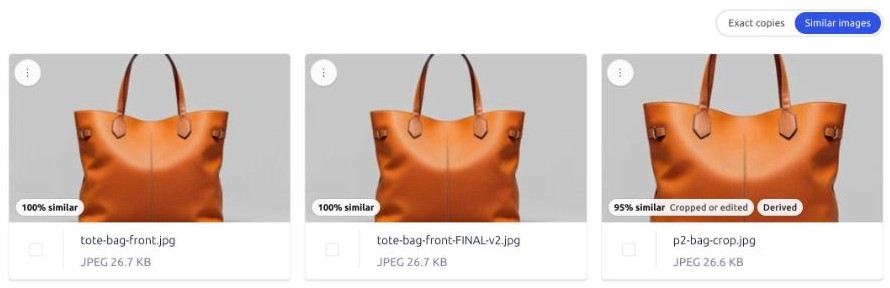
On any asset, Find duplicates (the asset toolbar, or the ⋮ menu on a card) lists its copies on the assets page. A switch next to the filter pill chooses Exact copies or Similar images. In the similar view each image shows how close it is ("97% similar"), whether it is Mirrored or Cropped or edited, and any recorded relationship ("Made from it"). The usual selection actions apply: edit metadata, add to a collection, move to the trash.
What an AI agent gets back
The FileSpin MCP server's find_duplicates tool calls the same API. With include_similar: true it returns the exact copies and the similar images with their details:
{
  "summary": "Found 1 exact copy of harbour.jpg. Also found 3 similar images (resized, re-saved or lightly edited), including mirrored or cropped versions.",
  "source": { "id": "2d0277d1eec548c5964f9e97943c19b4", "name": "harbour.jpg" },
  "duplicates": [
    { "id": "425f6a2a266d45d58d067f7c39a2e4bd", "name": "harbour-copy.jpg", "size_human": "35.5 KB" }
  ],
  "similar": [
    { "id": "8f0e1b2c3d4a4e5f8a9b0c1d2e3f4a5b", "name": "harbour-flipped.jpg", "method": "mirror", "distance": 0, "similarity": 1.0, "relationship": null },
    { "id": "093081e2bc47437eb4e95233ddf6ddff", "name": "harbour-web-600.jpg", "method": "hash", "distance": 2, "similarity": 0.97, "relationship": "child" },
    { "id": "c6dd202f494c480e8e18429421378078", "name": "harbour-crop-social.jpg", "method": "embedding", "distance": null, "score": 0.95, "similarity": 0.95, "relationship": null }
  ],
  "similar_total": 3,
  "phash_available": true,
  "embedding_available": true,
  "hint": "Similar images may be copies that came in from outside, and may lack the original's licence and rights metadata. Tell the user which ones. Offer to collect them for review …, or to copy the original's licence and rights fields onto them with update_metadata … Never delete … Do not change anything without the user's go-ahead."
}
The agent is told three things:
- What "similar" covers and what it does not (the table above), so it does not overclaim.
- What it may offer: to collect the copies for review, or to copy the original's licence and rights fields onto them. It does either only after the user says yes, and only the fields the user confirms.
- That it never deletes. Removing a copy is done by a person in the dashboard.
find_duplicates takes up to 10 assets per call. It does not scan the whole library: an agent asked to "find all duplicates" is told to ask which assets to check, or to search first and check the results.
Limits
- Per asset, not library-wide. There is no "show every duplicate cluster in the library" report.
- Similar means the same photo, not "the same product". A different shot of the same thing is not matched, and background-removed cut-outs are found only about a quarter of the time.
- Look-alike product shots and templated graphics. Two different products shot the same way on a plain background, or two graphics made from the same template with different text or colours, can still be listed as similar, mostly as
embeddingmatches. Check those before copying rights metadata onto them. - Images only. Videos and documents are matched as exact copies only.
- Existing images need indexing once. New uploads are indexed when processed. Images uploaded before then are indexed per account on request; until then they report
phash_available: falseorembedding_available: false. - Only indexed images are compared, on both sides. An image that has not been indexed is neither found as a copy nor searched from.