FileSpin for Adobe: Help and Support
How to use the FileSpin plugin in Photoshop, InDesign and Premiere Pro to bring assets from FileSpin into your work and save it back, plus fixes for common problems and how to contact support.
How to use the FileSpin plugin in Photoshop, InDesign and Premiere Pro to bring assets from FileSpin into your work and save it back, plus fixes for common problems and how to contact support.
How to use the FileSpin plugin in Figma, FigJam and Figma Slides to add images and videos from FileSpin to your designs and save designs back, plus fixes for common problems and how to contact support.
Set up the FileSpin plugin for coding agents so they look up exact FileSpin API and image URL syntax instead of guessing, write code against your account's real fields and CDN host, and upload local files and folders to FileSpin.
How to use the FileSpin app in Canva to add images and videos from FileSpin to your designs and save designs back, plus fixes for common problems and how to contact support.
You already have the product photo in FileSpin. Now the storefront needs a larger thumbnail, the email needs a wide banner, and the partner feed needs a square image. Preparing a separate export for each one leaves you with another set of files to maintain when those requirements change.
Configure Face Recognition, Image Analysis, and Remove Background to run automatically based on asset events and custom metadata — set up entirely from the Dashboard.
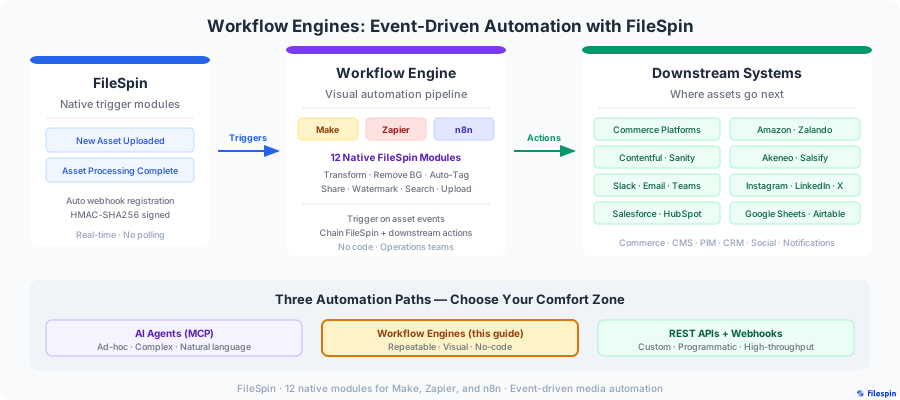
How to build visual automation pipelines using FileSpin's native modules for Make, Zapier, and n8n — triggered by asset events, powered by FileSpin operations, and connected to your downstream systems.
How MCP-compatible AI agents connect to FileSpin, discover a focused set of tools and workflow recipes, and execute end-to-end media operations through natural language -- setup, authentication, tool patterns, and real-world examples.

How to deploy FileSpin Teleport on your local hardware for hybrid cloud-edge media operations -- install, configure, integrate via REST APIs and hot-folder ingest, and sync to FileSpin Cloud when connected.

How to use branded share pages to replace zip-and-email workflows — sponsor deliverables, wholesale portals, press kits, client review cycles, and guest photo delivery with approval workflows, download controls, and analytics.
The end-to-end journey of an asset from upload to CDN delivery -- multipart upload, URL ingest, status polling, auto-processing, webhooks, and serving via CDN.

Designing, creating, and using asset schemas to add structured, searchable metadata to assets -- field types, naming conventions, preset templates, search integration, and best practices.

Index faces in your images, find every photo of a person from one reference photo in the Dashboard, through an AI agent or with the API, and manage face data.
Find assets by keyword, file type, upload date, custom metadata and addon status, in the Dashboard, through an AI agent or with the Search API, and page through large result sets.
Setting up webhook callbacks, understanding event types and payloads, handling retries, and building reliable event-driven integrations.
Build dynamic image URLs with resize, crop, format, quality and effects parameters, with tested recipes for responsive images, thumbnails, social cards, product images and placeholders.
Steps to resolve upload errors and replace failed assets in the FileSpin Dashboard.
How administrators can use Dashboard tools to get asset links, manage CDN cache, and reprocess assets.
Best practices for downloading asset content using the /get_link endpoint for superior performance and reliability.
Troubleshoot upload failures in the browser when using the FileSpin File Picker.
Common questions about FileSpin — file limits, storage, supported formats, browsers and devices.